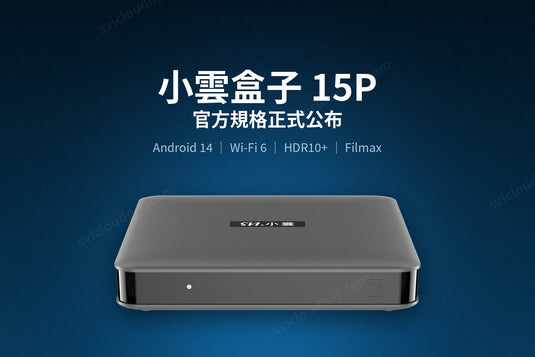
15P 最大的實際差異不是規格表上的數字,而是內建的 Filmax 播放器 —— 遙控器上更設有專屬快捷鍵。本文說明它能做什麼,以及如何接上你的硬碟或 NAS。
The 15P's biggest practical difference is the built-in Filmax player, with its own key on the remote. Here is what it does and how to connect your own storage.
Filmax 是本機播放器 / Filmax Is a Local Player
Filmax 用來播放你自己已經擁有的影片檔案 —— 存放在 USB 硬碟、電腦或 NAS 上的檔案。它不是串流服務,也不附帶任何影片內容。
Filmax plays video files you already own, stored on a USB drive, a PC or a NAS. It is not a streaming service and ships with no content of its own.
支援的格式 / Supported Formats
- BDMV / ISO 藍光原盤結構 —— 保留原始選單與章節
- MKV、MP4、TS、AVI 等常見容器
- 多重字幕軌與音軌,包括 PGS 圖形字幕
四種接駁方式 / Four Ways to Connect
1. USB 硬碟 / USB drive
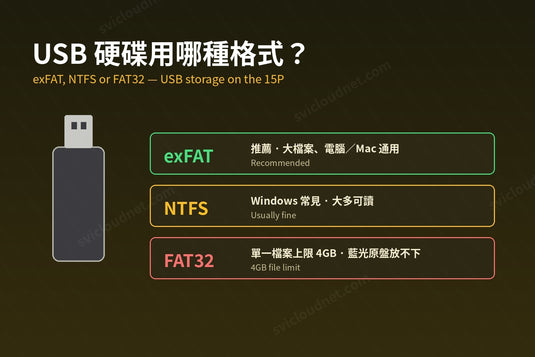
最簡單。接上 15P 機背的 USB 2.0 接口即可。建議使用 exFAT 格式 —— FAT32 無法處理超過 4GB 的單一檔案,而藍光原盤幾乎必然超過。
Simplest option. Format as exFAT — FAT32 cannot hold a single file over 4GB, and Blu-ray rips almost always exceed that.
2. 電腦共享資料夾 / PC shared folder
在 Windows 上把資料夾設為共用,Filmax 即可透過區域網絡存取。電腦需與電視盒在同一個網絡內。
3. NAS(區域網絡)/ NAS over your LAN
Filmax 在區域網絡支援 SMB、FTP 及 SFTP 三種協定,因此幾乎任何 NAS、電腦或路由器外接硬碟都能接上。播放大型 4K 原盤時,建議用網線接駁 RJ45 接口,比無線穩定得多。
Filmax speaks SMB, FTP and SFTP on the local network, so almost any NAS, PC or router-attached drive will connect. For large 4K remuxes, use the RJ45 port rather than Wi-Fi.
4. WebDAV(互聯網)/ WebDAV over the internet
不在家也能播。Filmax 支援 WebDAV,可連接雲端儲存空間或自架的 WebDAV 伺服器,不必先把檔案下載到盒子。播放品質取決於當地的上下行頻寬。
Filmax also supports WebDAV, so it can reach cloud storage or your own WebDAV server without downloading first. Playback quality depends on the bandwidth at both ends.
海報牆 / The Poster Wall
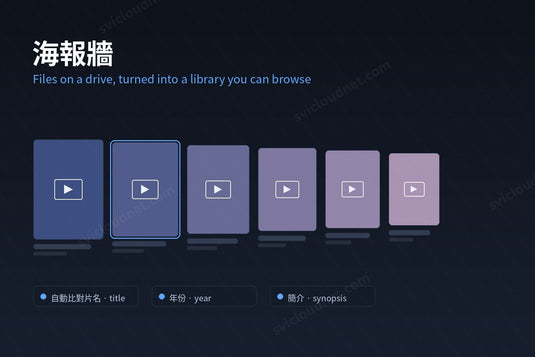
Filmax 會自動比對影片檔案,配上對應的海報、簡介與演員資料,組成海報牆介面,並可按類型篩選。檔案命名越規範(片名 + 年份),比對成功率越高。
Filmax matches your files to posters, synopses and cast data automatically. Consistent naming — title plus year — greatly improves match rates.
進階播放設定 / Advanced Playback Controls
- 字幕調整:切換字幕軌、調整大小與位置、外掛字幕檔
- 音軌設定:在多條音軌之間切換
- 音頻降級:把 TrueHD/DTS-HD 降混成擴音機支援的格式
- 音頻偏移:修正音畫不同步
- 3D 轉 2D:把 3D 影片直接轉成 2D 播放,不需要 3D 眼鏡
這些設定通常只在專用影音播放器上才找得到。若你使用擴音機,把 15P 的光纖 S/PDIF 輸出接到擴音機即可輸出多聲道音訊。
關於內容來源 / A Note on Content
Filmax 是播放工具,本身不提供影片。你播放的內容是否合法,取決於你的檔案來源 —— 請使用你自己擁有或有權播放的影片。
Filmax is a playback tool and supplies no video. Whether what you play is lawful depends entirely on where your files came from; please use material you own or are licensed to play.
延伸閱讀 / Related Reading
支援與教學 / Support & Guides
- 查詢訂單 — Track Your Order(輸入訂單編號即可查看物流狀態 / live carrier status)
- 小雲盒子完整安裝教學 — Complete Setup Guide
- 問題排解 — Troubleshooting
- 產品常見問題 — Product FAQs
- 售後服務與保固 — After-Sales & Warranty